When teams start using a new marketing platform, the biggest problem is often not the campaign strategy.
It is getting the ad account connected properly with all the events setup correctly.
You connect the account, everything looks fine and then the campaign refuses to launch because the login you used only has view access.
The good news is that this is usually easy to avoid.
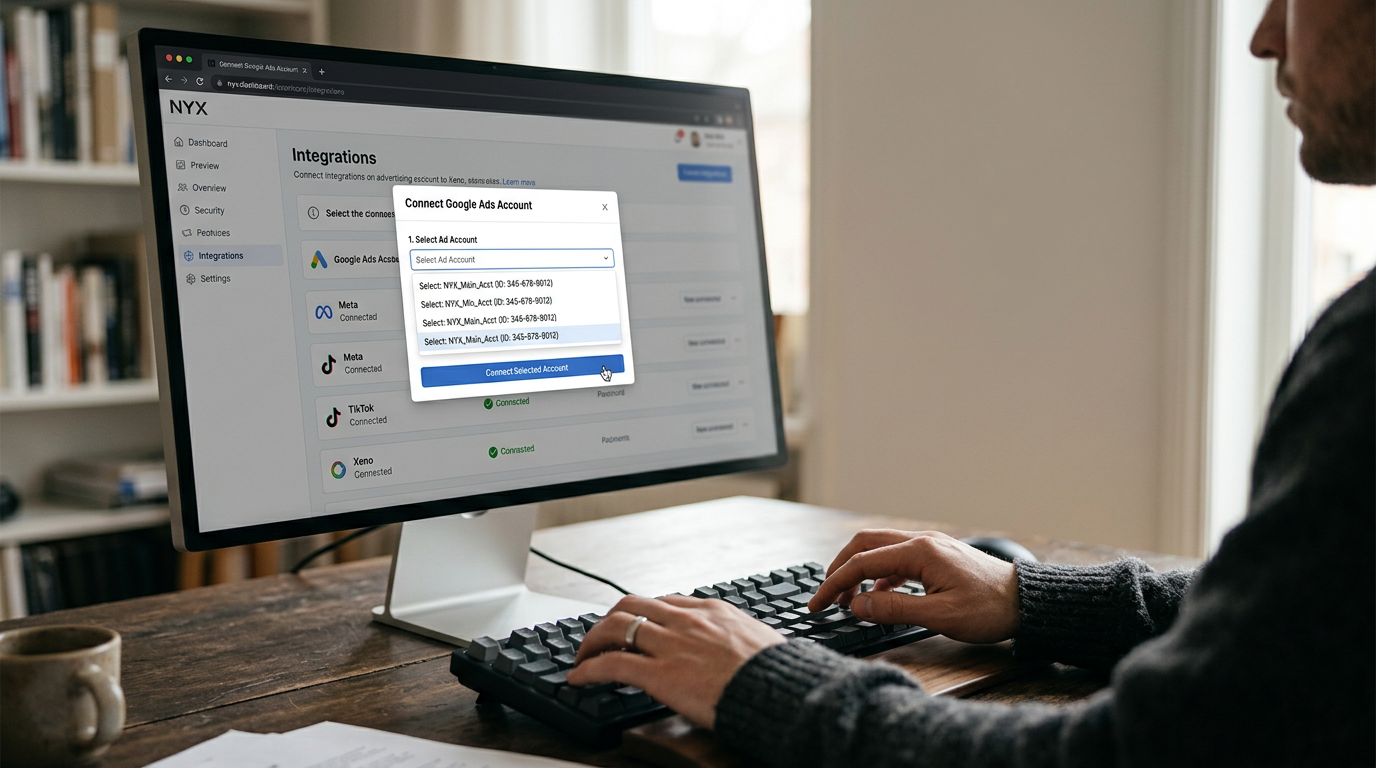
To connect an ad account to Xeno, open the Integrations page in NYX, choose the platform you want to connect and sign in with an account that has permission to create and edit campaigns.
Google Ads, Meta, LinkedIn, and Snapchat all follow a similar process.
The most important thing is making sure you have the right access before you start.
What happens when you connect an ad account to Xeno?
An ad account is where your campaigns, billing information, audiences, and ad spend live.
When you connect that account to NYX, Xeno can use it to create and launch campaigns.
This is more than just a reporting connection.
The campaigns Xeno creates appear inside your own advertising account, alongside the campaigns you already run.
You keep your existing account, history and relationship with the advertising platform.
It simply gets the access it needs to work inside that account.
Why can the connection work but the campaign still does not launch?
This is where many teams get stuck.
The connection itself can succeed even when the account is not ready to run campaigns.
Here are the most common problems.
1. You only have view access
You may be able to sign in and connect the account, but you cannot create or edit campaigns.
2. You connected the wrong account
This is common for agencies and companies managing several brands.
One login may have access to many ad accounts. It is easy to select the wrong one.
3. The payment method is not active
The account may connect successfully, but the campaign can stop once the platform tries to spend money.
4. Conversion tracking is missing
The campaign can run, but without proper conversion tracking, it becomes much harder for the platform to optimise toward meaningful results.
These problems can cost you time.
A new campaign also needs time to go through its learning phase, so every day spent fixing connection issues is a day you are not collecting useful campaign data.
That is why access should be sorted out first.
How do you connect an ad account to Xeno?
The basic process is simple.
1. Check your access first
Before opening NYX, make sure the account you plan to use can create and edit campaigns in the exact ad account you want to run.
If you do not have the right access, ask your account admin to update your role first.
2. Open the Integrations page in NYX

This is where your advertising platform connections are managed.
3. Choose your platform and sign in
Select Google, Meta, LinkedIn, or Snapchat.
Then sign in using the account that has campaign editing permissions.
Do not use a different login simply because it is the one you are already signed into.
4. Select the exact ad account

If you have access to multiple accounts, make sure you choose the right one.
Use the account ID to confirm it.
Account names can be similar or even identical. Account IDs are much safer to match.
5. Confirm the connection

Once the account appears as connected in NYX, you can use Xeno to create and launch campaigns into it. Also all the conversion Event will be visible here for quick check.
What access do you need on each platform?
The exact role depends on the platform.
Platform | Minimum access needed to launch | Common mistake |
Google Ads | Standard | Connecting with Read only access |
Meta | Advertiser on the ad account | Having Analyst access only |
Campaign Manager | Having Viewer or Creative Manager access | |
TikTok | Operator | Having Analyst access |
Here is what each platform requires.
Google Ads
Google Ads has four main access levels:
Admin
Standard
Read only
Email only
You normally need Standard access to launch campaigns.
Standard users can create and edit campaigns but cannot manage other users.
Admin access is only needed when you also need to manage people or account settings.
Before connecting, check two things.
First, find the Google Ads customer ID. It usually looks like:
123-456-7890
Make sure that matches the account you are connecting.
Second, check that conversion tracking is already working.
If the campaign has no conversion data, the platform has much less information to use for optimisation.
If the account is managed through a manager account, access from the manager can also flow down to the accounts underneath it.
Meta
Meta can be a little confusing because access is split into two levels.
First, there is access to the overall business portfolio.
Then there is a separate role on the specific ad account.
This distinction matters.
You may have Full control of the business portfolio but still only have Analyst access to the ad account you want to use.
To launch campaigns, you need the Advertiser role on the ad account itself.
Before connecting, check:
Your ad account role is Advertiser
Your payment method is active
You have access to the relevant Facebook Page
You have access to the dataset or pixel the campaign will use
Having full business-level access alone does not guarantee that you can launch campaigns from a specific ad account.
LinkedIn Campaign Manager has several roles.
The most important ones are:
Viewer
Creative Manager
Campaign Manager
Account Manager
Account Billing Admin
A Viewer can see reports.
A Creative Manager can work on ads but does not have full campaign management access.
A Campaign Manager can create and edit both campaigns and ads, which is the role you need to launch.
Account Manager gives you additional account and user management permissions.
There are also two things worth checking before you start.
The account should have an Account Billing Admin, and the LinkedIn Page connected to the account should be set up correctly for the campaign.
TikTok
TikTok manages ad account access through the Business Center.
The main roles are:
Admin
Operator
Analyst
You need Operator access to create and manage campaigns.
Admin gives you additional permissions for things like settings, members, payments, and financial information.
Analyst is read-only.
There is also an extra step to watch out for.
An ad account created directly in TikTok Ads Manager is not automatically part of Business Center.
If you need it in the Business Center, someone must request access and an ad account admin must approve that request.
Do this before you try to connect the account to NYX.
A simple example
Imagine a mid-sized D2C running-shoe brand moving from manual campaign launches to NYX.
The marketing manager decides to connect Google, Meta, LinkedIn, and TikTok in one sitting.
Google works immediately
She has Standard access.
The customer ID matches.
Conversion tracking is already working.
Done.
Meta connects but will not launch
She has Full control of the Meta business portfolio, so she assumes everything is fine.
But when she checks the actual ad account, she has only Analyst access.
The fix is simple: change her ad account role to Advertiser.
LinkedIn gets stuck
She has Viewer access, which is enough to see reports but not enough to create campaigns.
The company also has no one assigned as Account Billing Admin.
Those need to be fixed before the campaign can move forward.
TikTok needs one extra step
The ad account exists, but it was never added to Business Center.
Someone requests access.
The ad account admin approves it.
Now the account is ready.
The lesson is simple:
Check access before you open NYX.
That can save you from chasing permission problems later.
What happens after the accounts are connected?
Once your accounts are connected, you can manage campaigns through Xeno instead of jumping between several advertising platforms.
Xeno creates and launches campaigns inside your connected ad accounts.
Then Neo can bring the performance data back into NYX so you can look at your channels in one place.
Creative fits into the same process.
You can create assets in Pixeo, launch them through Xeno, and then measure the results in Neo.
That means the process becomes:
Create → Launch → Measure → Improve and scale
As you connect more accounts, you get a broader view of your marketing.
But the most important thing is still getting the right account connected in the first place.
Start with one account
You do not need to connect every ad account immediately.
A better approach is to start with the account that matters most.
Open the Integrations page, connect your highest-spend ad account, and launch one campaign through Xeno.
That gives you a quick way to confirm that your permissions, account selection, and setup are all correct before you connect everything else.
Frequently Asked Questions
- Do I need admin access to connect my ad account to Xeno?
- No,You usually need enough access to create and edit campaigns, not full admin access. That means: Google Ads: Standard Meta: Advertiser LinkedIn: Campaign Manager TikTok: Operator Admin access is mainly needed when you also want to manage users, billing, or account settings.
- Does connecting Xeno change my existing campaigns?
- No,Connecting an account does not rewrite your existing campaigns.Campaigns created by Xeno appear inside your existing advertising account alongside the campaigns you already have.You keep your account and its history.
- Why did my ad account connect but my campaigns will not launch?
- The most common reason is permissions.You may have connected successfully with a role that allows viewing but not campaign creation. Also check for: An inactive payment method An account review A security or login checkpoint Missing conversion tracking Start by checking your access role.
- Which ad platforms can Xeno run campaigns on?
- The source material lists Google, Meta, LinkedIn and Snapchat as supported platforms.However, platform availability can change.The safest place to check what you can connect right now is the Integrations page in your NYX workspace.
- Do I need to reconnect if I change my password?
- Yes ,Advertising platforms can break an existing connection when a login session is revoked, a password changes or your account permissions are reduced.If a previously working connection stops launching campaigns after an account change, check your permissions and reconnect the account from the Integrations page.