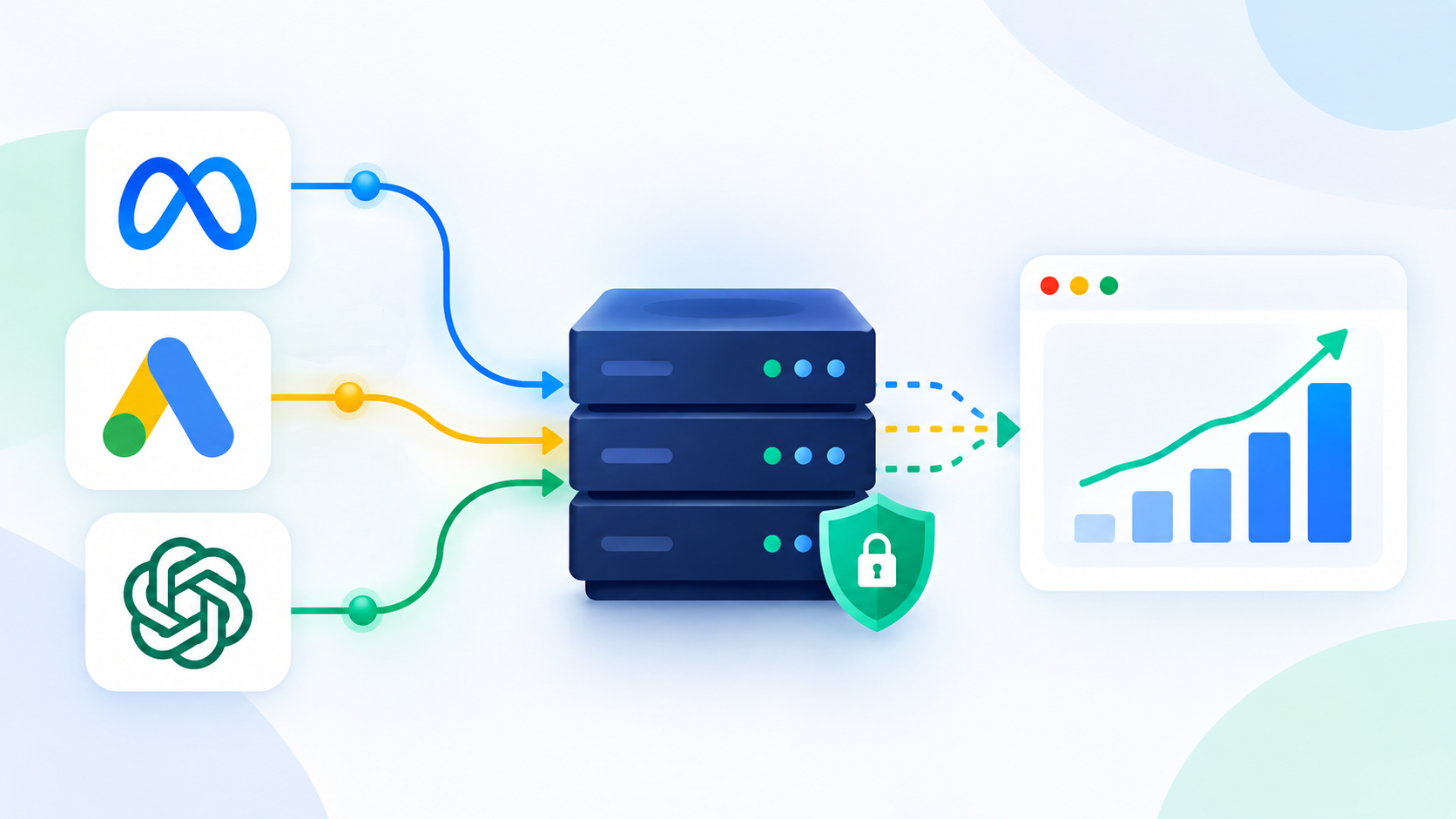
A Conversions API (CAPI) is a server-to-server connection that sends conversion events, purchases, leads, sign-ups, straight from your backend to an ad platform, instead of relying only on a browser pixel to report them. Meta, Google, and now ChatGPT Ads each run their own version of a conversions API for ads, and all three exist for the same reason: browser-based tracking alone now misses a large share of real conversions.
This post explains what CAPI actually does, how Meta's, Google's, and OpenAI's implementations differ, and what you need in place before you turn one on. The mechanics vary by platform, but the underlying idea is the same everywhere: give the ad platform's algorithm a second, more reliable channel for finding out what actually happened after the click.
What a Conversions API Actually Does
A browser pixel (the Meta Pixel, the Google tag, or the ChatGPT Ads Measurement Pixel) fires inside the user's browser when a page loads or a button is clicked. It depends on JavaScript executing, cookies persisting, and the browser allowing the request through. A Conversions API skips that path entirely. Your web or app server sends the same event, a purchase, a lead form submission, a trial start, directly to the ad platform's endpoint over HTTPS, with no dependency on what happens in the user's browser.
CAPI does not replace the pixel. Every major platform recommends running both together: the pixel captures real-time, in-browser signals, and CAPI supplies a server-side copy of the same events so nothing gets lost to a blocked script or an expired cookie. When both fire for the same conversion, the platform needs a way to avoid counting it twice, which is what deduplication (matching a shared event ID between the two sources) is for.
Why CAPI Exists: The Browser Tracking Problem
Pixel-only tracking has degraded steadily since Apple's App Tracking Transparency (ATT) framework and Intelligent Tracking Prevention (ITP) changes. In 2026, roughly 25 to 40% of desktop users run an ad blocker, Safari blocks third-party cookies by default, Firefox blocks trackers out of the box, and Apple strips click identifiers like fb CLID from links shared in Mail, Messages, and Private Browsing. The result is a widening gap between what actually happens on a website and what the ad platform's browser-based pixel can see.
That gap is not cosmetic. Ad platforms can only optimize bidding and targeting based on the conversion data they receive. A pixel that misses half of real purchases teaches the algorithm to chase the wrong signal, which shows up as unstable ROAS, inflated cost per acquisition, and campaigns that look worse than they actually are. CAPI exists to close that gap by giving the platform a source of conversion data that browser restrictions cannot touch.
Meta Conversions API (CAPI) Explained
Meta's Conversions API is a server-side endpoint that takes conversion events from your infrastructure, purchases, leads, add-to-cart actions, and posts them to Meta using existing first-party data such as hashed email addresses, phone numbers, IP addresses, and user agents.
How Meta CAPI works
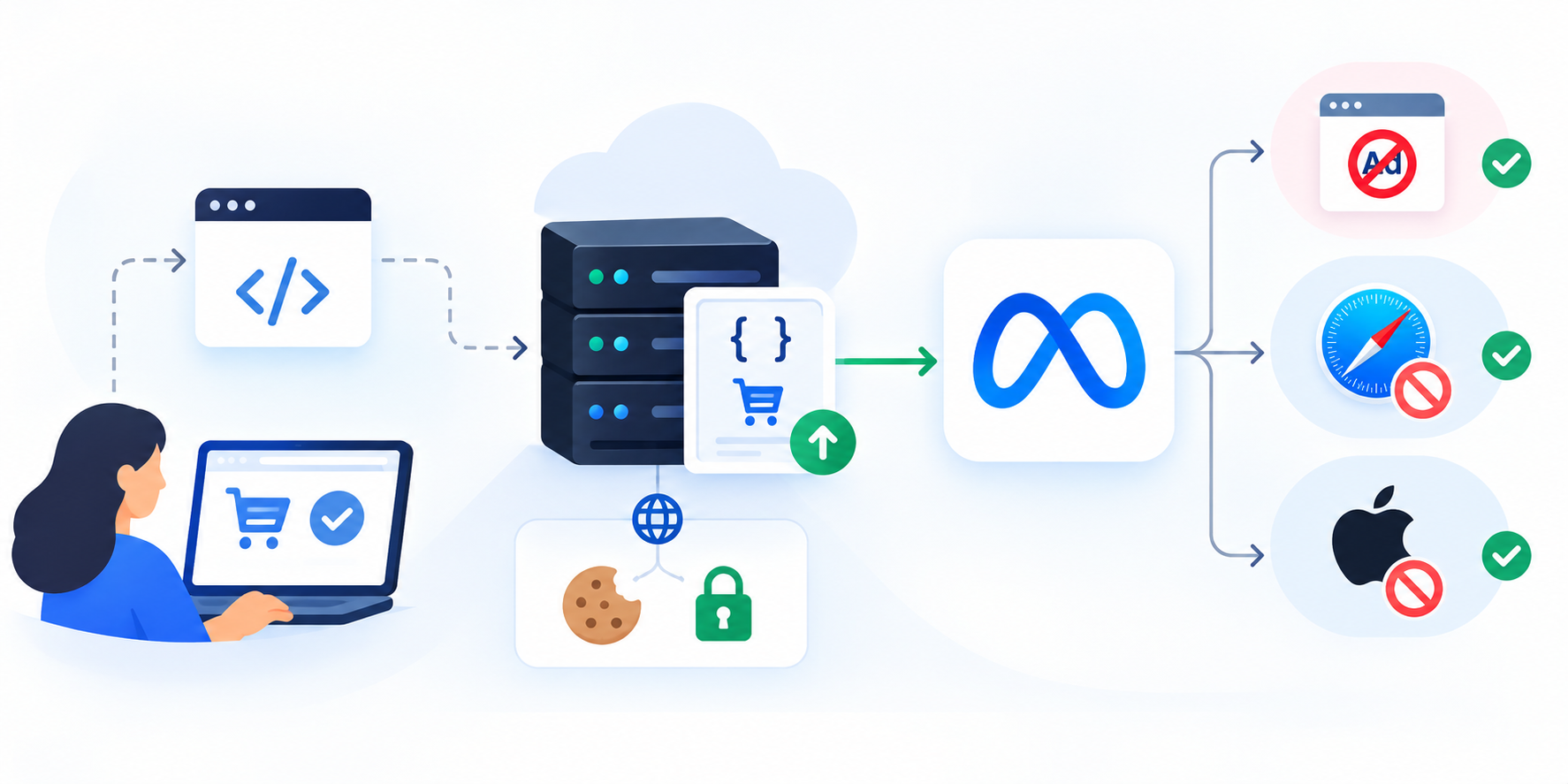
Your server constructs an event using the same structure the Pixel would send, then posts it directly to Meta's API. Because it runs server-to-server, it is resistant to ad blockers, Safari's ITP, and iOS privacy restrictions that interfere with browser-based scripts. It can also use first-party cookies if your tagging server sits on your own domain, which keeps matching accurate for longer than third-party cookies allow.
Setup methods and deduplication
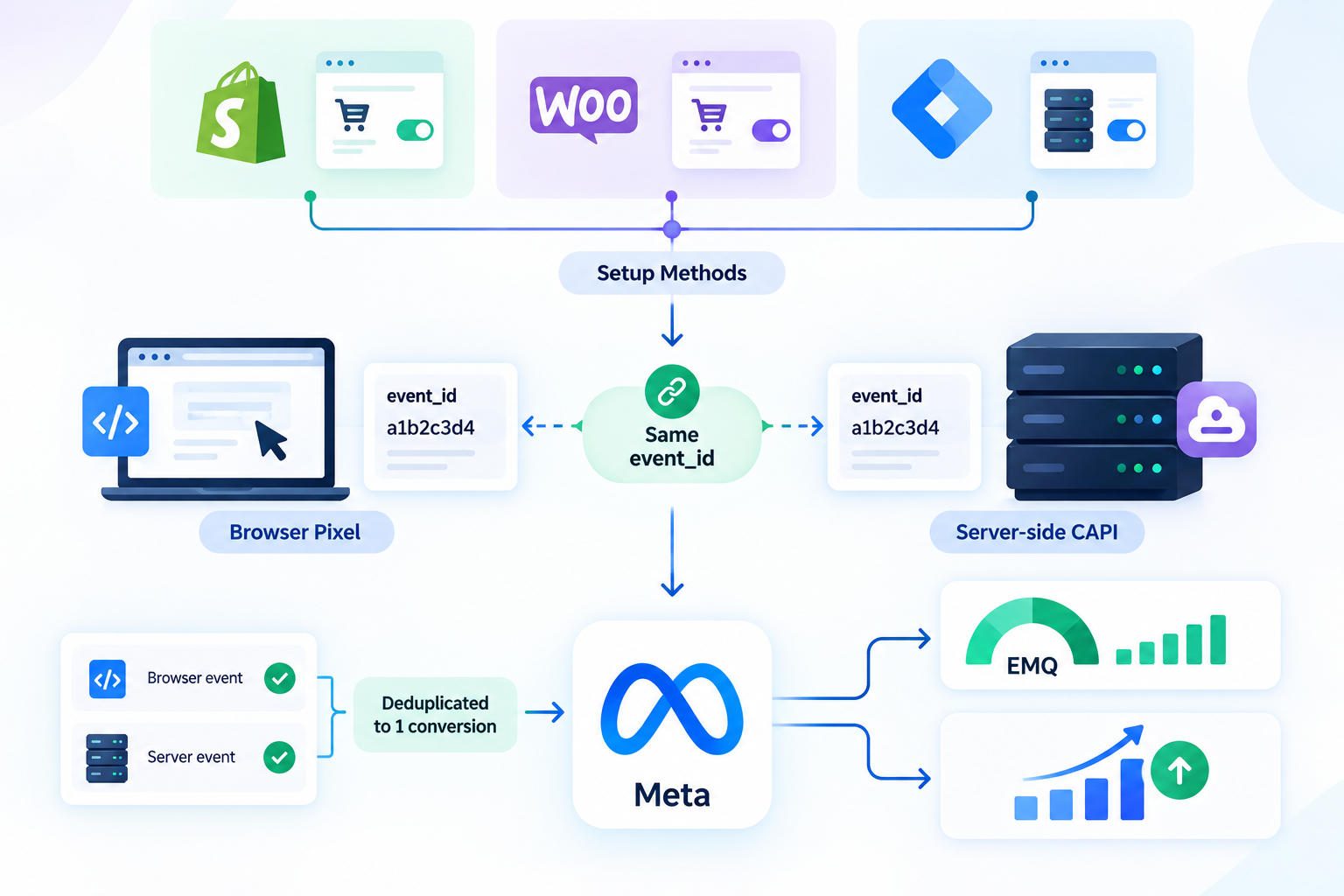
Most advertisers implement Meta CAPI through one of three routes: a native platform integration (Shopify and WooCommerce both offer built-in CAPI support), a server-side Google Tag Manager container, or a gateway service that handles the server-to-server connection for you. Whichever route you use, every event needs a matching event_id sent from both the browser Pixel and the server-side CAPI call.
Meta uses that shared ID to recognize the two calls as one conversion and count it only once. Meta also scores your setup with an Event Match Quality (EMQ) rating, which reflects how much verified first-party data (hashed email, phone, and other identifiers) accompanies each event; a higher EMQ generally means better matching and, over time, better predictive bidding performance.
Meta recommends every advertiser spending on Facebook or Instagram ads run CAPI alongside the Pixel in 2026. Reported recovery from adding CAPI on top of pixel-only tracking runs in the range of 20 to 30% of previously lost conversion data, though the exact figure depends on how much of your traffic was already unmeasured.
Google's Equivalent: Enhanced Conversions and Offline Conversion Import
Google does not use the name "Conversions API," but it runs the same underlying idea across two connected features: enhanced conversions and offline conversion import (OCI), both accessible through the Google Ads API or Google's newer Data Manager.
Enhanced conversions for web and leads
Enhanced conversions supplement your standard Google tag data by sending hashed first-party identifiers, email, phone, name, address, alongside each conversion event, so Google can match it to a signed-in Google user even when cookies or device-level targeting signals are limited.
As of April 2026, Google combined enhanced conversions for web and enhanced conversions for leads into a single on/off setting, and the platform now accepts user-provided data from website tags, Data Manager, and API connections without forcing advertisers to choose one implementation method up front.
Offline conversion import and the Data Manager API migration
Offline conversion import (OCI) is how CRM-driven events, a marketing qualified lead becoming a sales qualified lead, a demo turning into closed-won revenue, get uploaded back into Google Ads using the Google Click ID (GCLID) captured at the original click. Enhanced conversions for leads is effectively an upgraded version of OCI that adds hashed user data on top of the GCLID match, improving durability and reporting accuracy.
One date matters here for anyone running this through code rather than a UI: starting June 15, 2026, offline conversion imports and enhanced conversions for leads uploads move to the Data Manager API and are blocked in the legacy Google Ads API upload path. Developer tokens that have not sent a request between January and June 2026 will not be allowlisted for the legacy route, so any custom integration built before that migration needs to be pointed at Data Manager to keep working.
ChatGPT Ads Conversions API
OpenAI's ad measurement stack for ChatGPT Ads follows the same pixel-plus-server-side pattern as Meta and Google, built around three pieces: a JavaScript Measurement Pixel, a server-side Conversions API, and an Advertiser API for programmatic campaign and reporting access.
Pixel, CAPI, and the oppref Identifier
The ChatGPT Ads Measurement Pixel is a browser SDK that reports standard or custom website events back to a Pixel ID configured in Ads Manager. The Conversions API sends the same categories of events (page views, leads, purchases, subscriptions) from your backend using a Pixel ID and a Conversions API key issued in the Conversions section of Ads Manager. OpenAI's own guidance recommends running both together, hybrid tracking, especially given how early and fragmented browser-side measurement still is for a new ad surface.
Attribution runs through a click identifier OpenAI calls oppref, which needs to be captured from the landing page URL and stored in a first-party cookie so later conversion events can be tied back to the original ChatGPT ad click. As with Meta, deduplication between the browser pixel and the server-side CAPI call uses a shared event_id so OpenAI counts each conversion once, regardless of which source reports it first. OpenAI also supports mobile measurement partner integrations, currently AppsFlyer and Adjust, for advertisers who need to forward app or web conversions without building a direct server integration themselves.
Conversions API Across Meta, Google, and ChatGPT Ads
Factor | Meta CAPI | Google (Enhanced Conversions / OCI) | ChatGPT Ads CAPI |
|---|---|---|---|
Official name | Conversions API (CAPI) | Enhanced conversions / offline conversion import | Conversions API |
Pairs with | Meta Pixel | Google tag / GCLID | ChatGPT Ads Measurement Pixel |
Dedup mechanism | Shared event_id | GCLID plus hashed user data | Shared event_id plus oppref |
Primary upload path | Direct API, GTM server container, or gateway | Google Ads API moving to Data Manager API (June 15, 2026) | Direct API or GTM server-side template |
Data quality score | Event Match Quality (EMQ) | Match rate in diagnostics report | Not yet publicly scored |
Typical recovery reported | 20% to 30% of lost conversions | 5% to 15% per platform when run alongside Meta | Not yet benchmarked; platform still early |
How to Set Up a Conversions API Without Breaking Your Data
The steps below generalize across Meta, Google, and ChatGPT Ads. Platform-specific field names differ, but the sequence does not.
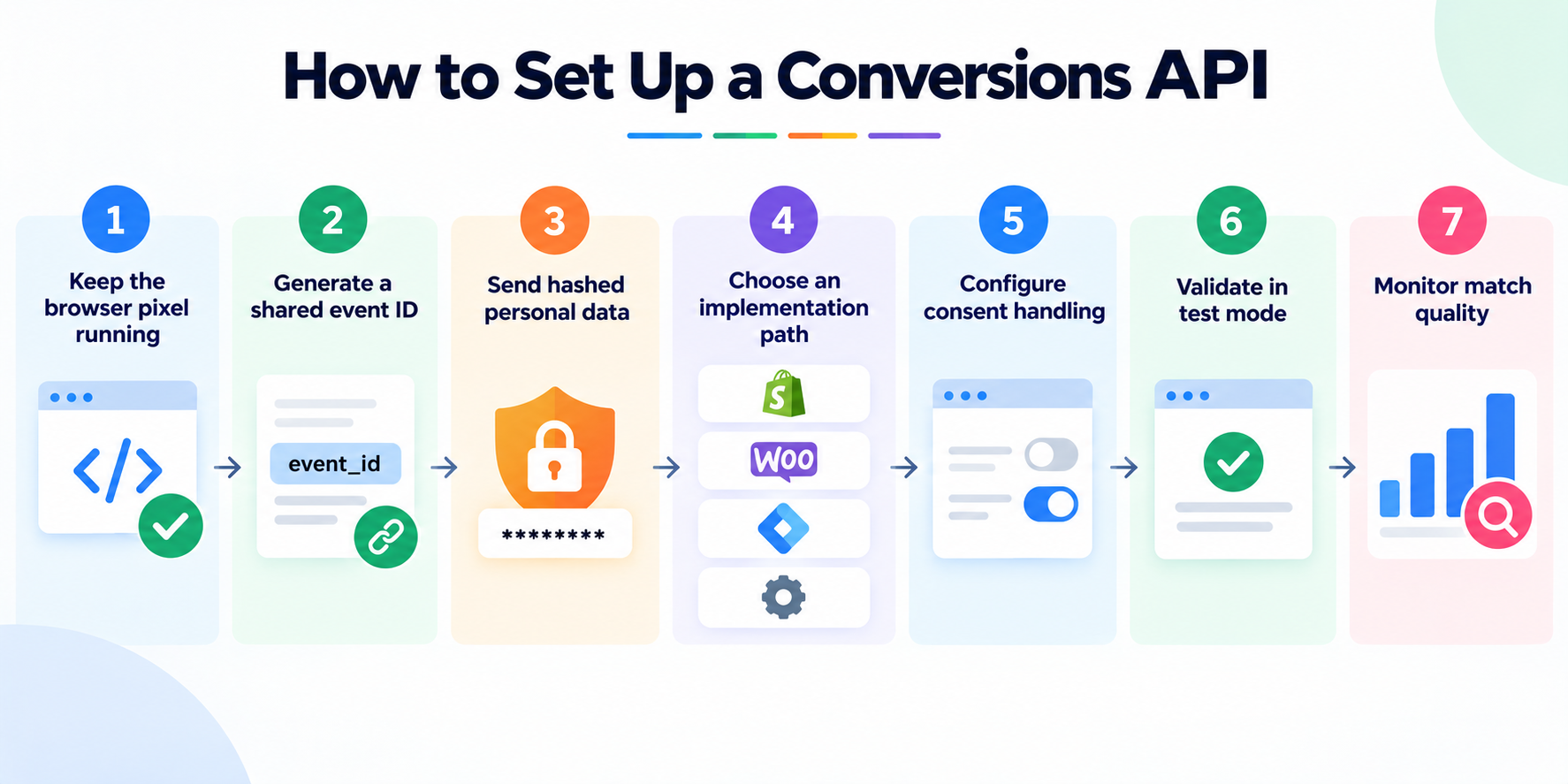
Keep the browser pixel running. CAPI supplements pixel tracking, it does not replace it. Removing the pixel loses real-time browser context that server-side events alone cannot fully reconstruct.
Generate a shared event ID for every conversion. Pass the same event_id (or GCLID, for Google) to both the browser-side call and the server-side call so the platform can deduplicate rather than double-count.
Send hashed, not raw, personal data. Email addresses, phone numbers, and other identifiers should be hashed (commonly SHA-256) before they leave your server, on every platform.
Choose an implementation path that matches your stack. A native platform integration (Shopify, WooCommerce) is fastest for standard ecommerce events and pairs well with dynamic catalog and Shopping ads tracking. A server-side Google Tag Manager container gives more control across multiple platforms from one place. A gateway service trades some control for faster setup.
Configure consent handling before you launch. Where Consent Mode v2 or an equivalent applies, tracking should default to denied until a user consents, with server-side events respecting the same consent state as the browser pixel.
Validate in test mode before going live. Meta's Test Events tool, Google's diagnostics report, and OpenAI's Validate Only mode all let you confirm events are structured correctly before they affect live reporting or bidding.
Monitor match quality on a schedule, not just at launch. EMQ scores, Google's match rate, and equivalent diagnostics drift as identifiers age out or a checkout flow changes. Treat it as ongoing performance monitoring and revisit quarterly, not once.
Common CAPI Mistakes That Silently Hurt Performance
Sending events from only one source. A CAPI implementation with no browser pixel, or a pixel with no CAPI, misses signal the paired setup would catch.
Mismatched event IDs. If the ID sent from the browser and the ID sent from the server do not match exactly, the platform reports two conversions instead of one, inflating your numbers in a way that looks good until someone checks against actual revenue.
Skipping deduplication testing. Deduplication failures are invisible in day-to-day reporting until a finance or analytics team reconciles ad platform numbers against actual order counts.
Treating CAPI as a one-time setup. Checkout flow redesigns, CRM migrations, and new consent banners can silently break server-side event mapping. A working integration in January is not a guarantee it is still working in June, which is why it belongs in your regular campaign optimization cycle.
Ignoring the Google Ads API deprecation timeline. Any custom offline conversion or enhanced conversions for leads integration built on the legacy Google Ads API upload path needs to move to the Data Manager API before June 15, 2026, or uploads stop working.
Bottom Line
A conversions API is the server-side half of modern conversion tracking, and in 2026 it is close to mandatory rather than optional on any platform where you spend real budget. Meta calls it the Conversions API, Google splits the same idea across enhanced conversions and offline conversion import, and ChatGPT Ads runs a comparable pixel-plus-API pattern built around its own oppref click identifier.
The mechanics differ by platform, but the setup checklist does not: keep the pixel, deduplicate with a shared ID, hash personal data, respect consent, and validate before you go live. Get that right and the ad platform's algorithm is finally working from data that matches what actually happened. If you want help checking whether your own tracking is feeding clean data, you can book a walkthrough with the NYX team.