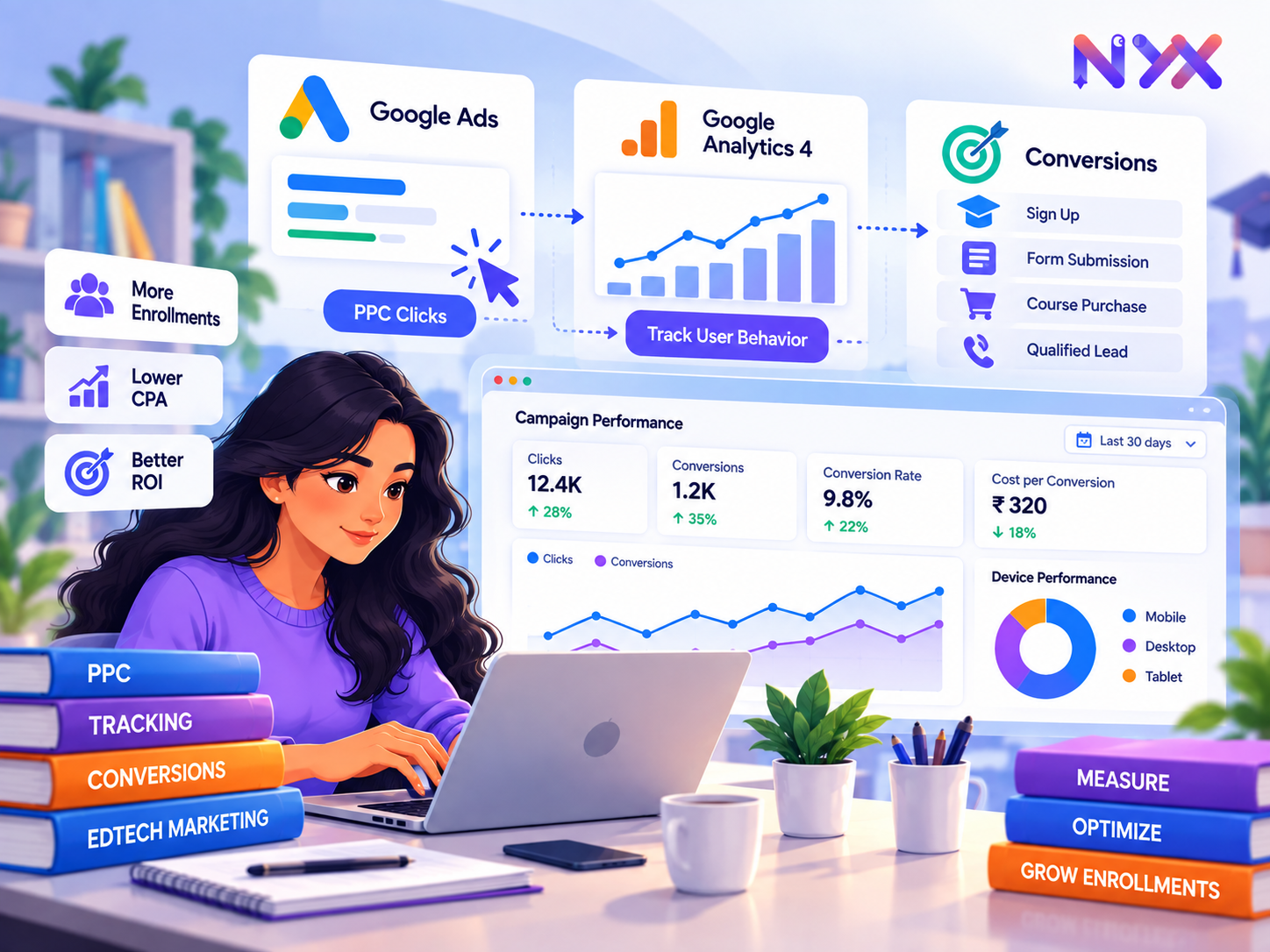
To track an EdTech PPC campaign properly, connect the ad click to a meaningful action and then to the admissions or sales outcome. A click says the ad brought a visitor; a form submission says a visitor raised a hand; a qualified application or paid enrolment says much more about value. Tracking should show these stages separately, with clear definitions and a tested route from website or app to CRM and reporting.
This guide uses Google Ads and GA4 as the main example. The same measurement discipline applies to other channels, although setup steps and attribution rules differ. A founder should be able to ask, “Which campaigns led to enrolled learners or qualified institutional opportunities, and how confident are we in that number?”
Define The Funnel Before Installing Tags
Write down the events that matter for each programme. A practical consumer funnel could be ad click → course page view → valid enquiry → counselling booked → qualified applicant → application → enrolled learner. An enterprise funnel could be ad click → demo request → qualified account → opportunity → signed contract. Keep invalid phone numbers, duplicate forms and unrelated requests outside the qualified count.
Assign one owner to each stage and document when it is recorded. Google Analytics recommends events such as generate_lead, qualify_lead, working_lead and close_convert_lead for lead-generation journeys. Use names consistently and only send events when their defined action happens. A button click is not a completed form.
Step 1 - Link The Ad, Analytics And Destination
Confirm that the Google Ads account, GA4 property, website or app and CRM relate to the same business and intended conversion. Verify the landing page URL and that the Google tag or GTM container loads on the site. Enable appropriate auto-tagging in Google Ads and preserve click identifiers through redirects where relevant. Add campaign UTMs for cross-platform reporting, with a consistent naming convention. Do not manually put sensitive personal information in URLs.
Check consent and privacy requirements for the markets served. A tag that loads does not automatically mean every event is collected or available for advertising use. Record the scope of what can and cannot be measured.
Step 2 - Track Completed Online Actions

Set up a conversion event on a genuine success state: a thank-you page that only appears after submission, a confirmed form success event, a booked appointment or a completed payment. Prevent double counting from page reloads or repeated event dispatches. For a multi-step application, measure stages separately and choose the one that represents the campaign's primary goal.
Use GA4 DebugView and the browser's developer or tag diagnostics to test the event, then verify its appearance in normal reports after processing. In Google Ads, create or import the appropriate conversion action and review whether it is included in the “Conversions” column used for bidding. Keep softer actions such as brochure views as secondary if they should not steer bidding.
Step 3 - Connect Offline Qualification And Enrolment
Most EdTech value appears after the form. Give each lead a unique CRM record; retain permitted source, campaign, landing page and click identification; and update stages when a counsellor validates fit or an applicant pays. Google's enhanced conversions for leads can match offline outcomes back to ads using securely processed user-provided data captured at the lead event and subsequently imported through supported pathways. Google's current guidance recommends Data Manager for this flow. Follow platform setup and consent requirements rather than uploading raw lists casually.
Make the stage definitions explicit. For example, “qualified lead” might mean reachable, eligible for the programme, interested in the next intake and within the intended geography. Do not equate a connected call with a qualified applicant. Deduplicate records, account for refunds and decide whether a repeat application is one lead or a new opportunity.
Step 4 - Reconcile The Numbers

Check the chain each week: Google Ads clicks versus site sessions; form-success events versus backend submissions; GA4 leads versus CRM leads; qualified leads versus applications and enrolments. These numbers need not be identical because of attribution, consent, blockers, time zones, delays and different counting methods. Large unexplained gaps deserve investigation.
For each conversion action, document its counting method, window, source, attribution model and primary or secondary status. Google Ads generally reports attributed conversions against the ad-click date, which can differ from the calendar day a lead was created. A weekly report should state the date basis and allow for late qualification.
A Simple Qa Checklist
Open an ad destination on desktop and mobile. Submit one test lead with a unique test identity after following the consent flow. Confirm a single website event, a single backend record and the correct CRM stage. Follow a test lead through qualification and, if implemented, an offline import. Check that the Google Ads conversion action receives data after processing. Repeat after changes to forms, checkout, redirects, tag manager or CRM integrations. Do not use real customer data for a casual test.
When numbers fall suddenly, distinguish a campaign problem from a broken tag. Check whether spend and clicks changed, whether pages still load, whether the form succeeds, whether events fire and whether the CRM sync is operating. A zero-conversion dashboard can mean zero demand or zero measurement.
What To Report
At campaign and programme level, show spend, clicks, valid leads, qualified leads, booked calls, applications, enrolments and revenue or value where appropriate. Add conversion rates and cost at each stage. Include a note for incomplete cohorts and attribution limits. For long courses, a cohort view by lead month is more useful than forcing every enrolment into the current week's spend.
Illustration: a campaign spends ₹1,00,000 for 2,000 clicks, 100 valid leads, 30 qualified leads and five enrolments. CPC is ₹50, CPL is ₹1,000, cost per qualified lead is about ₹3,333 and ad cost per enrolment is ₹20,000. These hypothetical figures can change substantially if late enrolments or refunds arrive. A decision should consider tuition collected, variable costs and cohort maturity.
NYX's cross-channel dashboard would be most useful here when Google Ads, site and CRM data are joined under consistent definitions. A recommendation to scale a campaign based on cheap forms would be weaker than one supported by qualified enrolment outcomes.
Frequent Tracking Failures
Counting page views as leads, firing the form event before success, importing both GA4 and Google Ads versions of the same event as primary, losing source data in a redirect, leaving duplicate CRM records, failing to pass later-stage outcomes and comparing different attribution dates can all distort results. Investigate the actual event path before changing bids.
A Measurement Specification The Team Can Share
For every event, record its business definition, trigger, source system, unique identifier, owner, expected delay, value, consent basis and whether it is primary for bidding. An example row might read: qualify_lead; admissions marks a reachable applicant eligible for the stated programme; CRM stage update; unique lead ID; admissions owner; usually within three working days; value estimated from historical enrolment rate; offline import; primary only after QA. The value and timing are illustrative and should be replaced with company data.
This specification helps engineers implement the correct event and gives marketers a way to detect drift. If admissions changes the definition of “qualified,” report the effective date and avoid comparing the old and new series as if nothing changed. When a new agency or platform is added, share the same measurement dictionary.
Diagnose A Mismatch Systematically
If clicks rise but sessions do not, examine redirects, page load and analytics consent. If sessions rise but forms do not, inspect the offer, page speed, mobile form and actual search terms. If backend forms exceed analytics leads, test whether the event fires reliably after success and whether consent affects reporting. If CRM leads exceed ad-platform conversions, review source capture, duplicate records, attribution windows and upload status. If qualified leads collapse while raw leads remain steady, examine query intent, form quality and admissions classification.
Keep the reconciliation at aggregate and sampled-record levels without exposing personal details in a presentation. Every discrepancy does not have to be eliminated; it must be understood well enough that decisions remain sensible. Document a known tolerance range based on the system's history and investigate deviations from it.
Reporting For A Long Admissions Cycle
Suppose September media generates 200 valid enquiries. By September 30, only some have completed counselling and fewer have paid. A report that divides September spend by September enrolments can mix old leads with new spend. Maintain a cohort view: group leads by first enquiry month and update their qualification, application and payment outcomes over time. Keep a separate calendar view for current cash collections. Explain the difference to stakeholders.
Look at stage conversion rates by campaign and programme, but also inspect the number behind each rate. A 50% enrolment rate from two qualified applications is weak evidence. Use CRM notes to understand why applications are lost: price, prerequisites, schedule, location, competition or contact failure. The tracking system should make these operational causes visible, not merely produce a dashboard number.
Data Ownership And Governance
The growth lead owns campaign names and destination tagging; the web team owns on-site events; admissions owns stage definitions and timely updates; an analyst owns reconciliation. Assign an escalation path when one handoff breaks. Restrict access to learner or patient details and send only the data needed for measurement under applicable consent and policy. A well-documented, modest setup is more reliable than a complex integration no one checks.
What Should The First Tracking Review Deliver?
Select one lead path and trace it end to end. Make a real test submission from an ad click, record the landing URL and click identifier where available, verify the success event fires once, and find the matching CRM record. Confirm that qualification or enrolment updates can be related to the original lead without exposing unnecessary personal information in reports. Give the team an owner for every handoff and a simple issue log. The result should be a trusted conversion definition and a list of gaps, not only a screenshot showing that a tag fired.